
Catch the mistake before it’s sent.

  • Policy violations
  • Regulatory infractions
  • Incorrect or outdated facts
  • The wrong audience

InPolicy is the everything check — just like spell check, but for every other kind of mistake, in email, chat and docs.

“If you can build a thing that flags problematic shit before they send it, you will end up a billionaire.”
Deputy General Counsel & Chief Compliance Officer, global entertainment company

Checking every sentence in real time wasn’t possible until now.

Companies have always had the policies. What they never had was a way to apply them to everyone, while they are still writing.

  1. 01

    Typically flagged in 1 to 2 seconds

    A sentence is typically flagged 1 to 2 seconds after it is written, while it is still on the writer’s screen.

  2. 02

    Our own pipeline, built for this one job

    A general model reading every message against hundreds of policies is too slow and too expensive to run as someone types. InPolicy runs on a pipeline we built for exactly this: your policies structured for AI, the rules that matter picked out for each message and an answer back while the writer is still typing.

  3. 03

    Context, managed automatically

    Whether a rule applies depends on who is reading, what was said earlier in the thread and the facts behind the rule. InPolicy assembles that for every message on its own, including the facts it gathers from your own website, so the model is judging this message rather than matching words.

  4. 04

    Measured on real email

    We test on real companies’ email from public archives, against policies built from each company’s own public record. Every flag has to show the policy or fact it rests on, and in the everyday email we test on, around 1 to 2% of emails get one.

    Read the case studies

Watch it catch one.

Someone is about to tell a colleague to backdate a sales proposal. This is what appears on their screen before they press send.

  • Warns, never blocks

    The message still sends if the writer decides it should. We don’t hold it, and we don’t route it to anyone.

  • Clears when the writer fixes it

    Edit the sentence and the flag goes away. If the writer disagrees, one click dismisses it.

  • Explains the rule

    Each flag names the policy and says why. Where the policy allows it, it also suggests a safer way to make the same point.

  • Private to the writer

    The flag appears on the writer’s screen. Legal sees counts by policy and team, and it never sees who wrote what.

“Speed bump, don’t stop them from sending the email.”
Head of Capital Markets, commercial real estate firm
  • Spelling
  • Grammar
  • Everything else

The mistakes spell check can’t see.

Spell check knows words and grammar check knows sentences. InPolicy knows your business: the policies you publish, the guidance you point it at and the facts on your own website. That is how it can tell when a message says the wrong thing.

Six of the warnings it raised on real companies’ email, from our case studies.

Insurance and reimbursement

“I figured that I would provide some pointers… ALWAYS check the ‘Patient is opioid tolerant’ box on the first page.”

Field staff don’t coach clinical answers on insurance forms.

Pharmaceutical sales company, read the case study
Anti-kickback

“Although this is a Medicare patient, I am requesting we do provide a super voucher. (we have failed to get this patient approved)”

No free product or savings vouchers for patients on Medicare or other government programs.

Pharmaceutical sales company, read the case study
Corporate records

“We need to get a written consent out to BOD members to increase the size of the employee option pool. This should be dated yesterday.”

Don’t backdate documents or misstate when something happened.

Nicotine vaporizer company, read the case study

Financial reporting

“While both of these items would more appropriately be charged to expense in 2001, we could probably accelerate them into 2000 without too much visibility.”

Don’t adjust entries or estimates to hit a target.

Energy trading company, read the case study

Access controls

“I used [name]’s ID (because I did not have access) to access about 20 deals, and I killed these deals.”

Don’t use a system or account you aren’t authorized to use.

Energy trading company, read the case study
  • Forward-looking statements
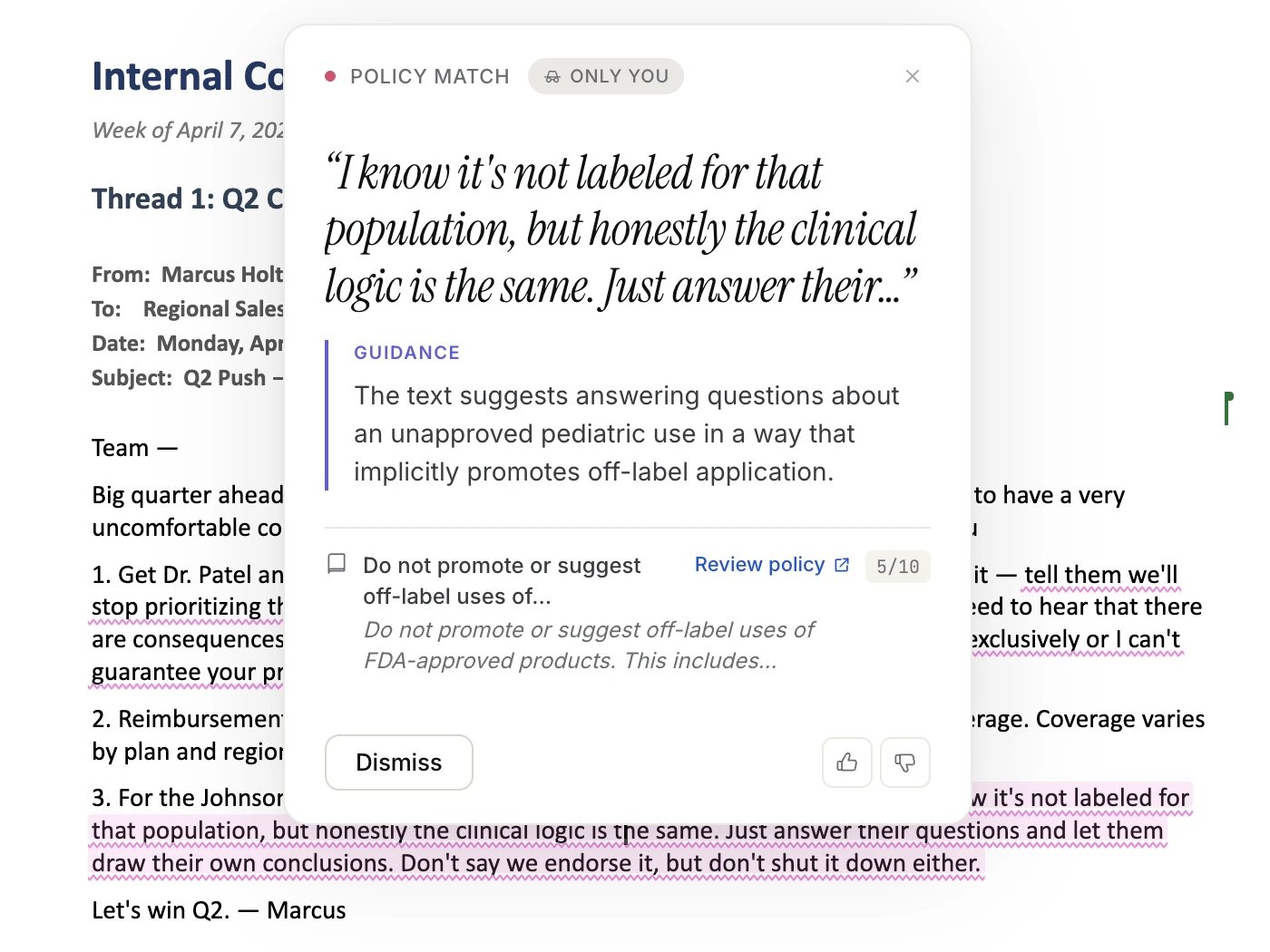
  • Off-label promotion
  • Admissions of liability
  • Promising unreleased features
  • Misquoted pricing
  • Unapproved discounts
  • Confidential project names
  • Customer data sent to vendors
  • Disparaging competitors
  • Expired offers
  • Discriminatory language
  • Unapproved testimonials

What your people see. What Legal sees.

Alerts look and feel like spell check, on the writer’s own screen. If they fix the issue, no one needs to know. Legal gets a dashboard of which policies are being triggered and fixed, so you can spot confusion without singling out specific employees.

The writer gets a private correction, in the moment.

The flag appears on the writer’s screen with the policy, the reason and, where the policy allows it, a suggested fix. Fix it and it’s gone. There is no ticket, and nobody else is involved.

InPolicy policy-match card in a Google Doc: a flagged sentence about off-label use, the guidance, and the policy it matched

Legal sees the pattern, never the person.

Analytics show which policies get triggered, fixed and dismissed, by team, so you can see which rules people misunderstand. They carry no user IDs and no message text, and teams under five people aren’t broken out.

InPolicy analytics dashboard: violations flagged, fixed, self-resolved and ignored, in total and per policy, with charts by policy area and by severity
“It’s just an extra set of eyes for compliance and legal.”
VP of Compliance, diagnostics company

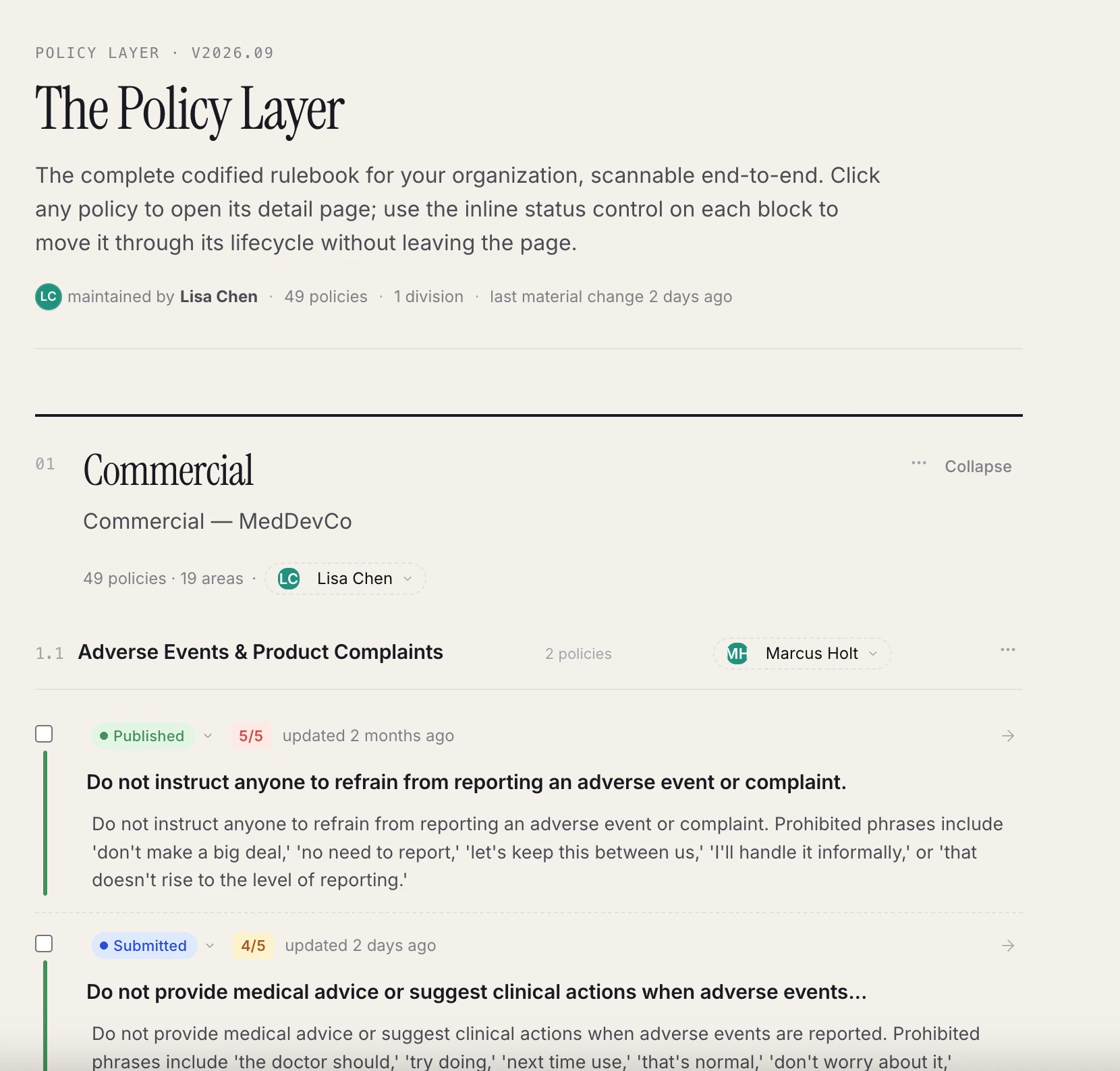
Don’t just publish policies. Put them in front of people.

The policies exist. The problem is that nobody reads them at the moment it matters. InPolicy puts the right rule in front of the right person while they are still typing.

“The response is always ‘we didn’t know’. As you and I both know people do not read.”
VP of Compliance, diagnostics company
InPolicy policy outline: the policy layer as one scannable document, with divisions, policy areas and each rule's status
  1. 01

    You decide the policies

    Bring the policies you already have, write your own, or have InPolicy draft a starting library from research into your products, your market, your customers and the rules you operate under, typically a few hundred policies. We can help with any of it, and every policy is yours to keep, change or drop.

  2. 02

    Your team reviews and publishes

    Each policy is one checkable rule with a scope: who it applies to, where and when. Nothing is checked until your team publishes it, and your team can edit, narrow or retire any policy at any time.

  3. 03

    Your facts keep the rules current

    Pricing, product claims, published terms: InPolicy gathers what a rule needs from your website and documents, or shows you which fact is missing so your team can supply it.

  4. 04

    IT deploys

    The extension is pushed to managed browsers the same way IT pushes any other extension. People are signed in automatically through Google Workspace or Microsoft, and rules apply by team.

  5. 05

    Checks run where people already write

    In Chrome, including managed Chrome: Gmail, Google Docs, Slack and any web app with a text field. Policy Bot reviews whole documents in Google Docs, Slides, Word and PowerPoint and leaves comments.

The same rules apply to your AI.

The policies you load for email also cover what your company writes with AI, whether that is Claude, Cursor and other MCP-compatible assistants through our MCP server, or agents you build on the API. One policy library, one set of answers.

How it works for agents

Ready for your security review.

InPolicy reads sensitive communications, so it is built to be reviewed. Message text is processed in memory and never written to storage, and our systems are hosted in the United States. Every model provider we use runs under zero-data-retention terms: prompts and responses are not kept and are never used for training. Our controls are monitored continuously by Oneleet, and our security policies, subprocessors and SOC 2 status are on our Trust Center.

Visit the Trust Center
  • Never used for training

    Your data is never used to train AI models, ours or anyone else’s.

  • Independently tested

    Third-party penetration testing, with the report available through our Trust Center.

  • Aggregate analytics only

    Legal sees totals by policy and team. Nothing links a flag to the person who wrote it or to what they wrote.

  • Enterprise sign-in

    Single sign-on and role-based access, so only the people you choose can change policies.

See it run on your own policies.

A 30-minute call. We show InPolicy running on a policy library built for your organization, then start with the teams that send the risky email: sales, marketing, customer success.

“It’s cheaper to use your tool than have another headcount.”
VP of DEA Compliance, pharmaceutical manufacturer
“Get a little more confidence in flagging at the moment as opposed to after the fact.”
General Counsel, consumer wearables company
“To say you have a policy doesn’t mean you enforce it.”
Chief Innovation Officer, legal services company

The questions legal and compliance teams ask first.

Full FAQ
Does it block anyone from sending?

No. InPolicy warns while the writer types. They fix the sentence, or dismiss the flag with one click, and the message sends when they decide it should. Nothing is held, queued or escalated.

Who decides the policies?

You do. Your team can write policies, upload the ones you already have, or have us research your organization and draft a starting library for you to review, and we can help at any step. Nothing is checked until your team publishes it, and your team can edit, narrow or retire any policy at any time.

How often is it wrong?

Every flag has to show its grounding: the policy it rests on, the fact it contradicts, or both, so the writer can see why it fired and dismiss it in one click if they disagree. Around 1 to 2% of email gets a flag. Your team can narrow or retire a policy that fires too often, and the analytics show flagged, fixed and dismissed counts per policy, so you can see which rules need work.

What do you store?

Message text is processed in memory and never written to storage, and our systems are hosted in the United States. Inference runs under zero-data-retention terms, so prompts and responses are not kept and are not used to train any model. What remains afterwards is a count: which policy fired, whether the flag was fixed or dismissed, by team. No user IDs, no text. Your policy documents are stored encrypted on Google Cloud in the United States.

Who sees a flag?

The writer. Legal sees aggregate counts by policy and team, and teams under five people aren’t broken out.

Which apps does it cover?

Chrome, including managed Chrome through Google Workspace: Gmail, Google Docs, Slack and any web app with a text field. Policy Bot reviews whole documents in Google Docs, Slides, Word and PowerPoint and leaves comments.

Can InPolicy staff read our messages?

No. Message text is never stored, so there is nothing to read afterwards. The data we do hold, your policy documents and account records, is accessed by InPolicy personnel only to support the service at your request or under a legal order, and that access is logged. Read the security addendum.

What does a first deployment look like?

Your team chooses how the policy library is built: from the policies you already have, written by your own people, or drafted by us from research for your review, typically a few hundred policies. Nothing is checked until your team publishes it. IT pushes the extension to managed browsers the way it pushes any other extension, people are signed in automatically through Google Workspace or Microsoft, and the rules apply by team from the first day. Your security team gets the DPA, security addendum and Trust Center up front.